
You do not need a clone app to run two WhatsApp accounts on one Android phone: WhatsApp’s own multiple-account feature allows two accounts on one device, as long as each has its own phone number. A clone app such as Duo Clone is for what that feature does not cover, such as the WhatsApp Business app, more than two accounts, or two accounts you want to keep apart with their own name, colour and lock. A “WhatsApp mod” is something else: a changed version of WhatsApp that breaks WhatsApp’s terms.
Can WhatsApp itself run two accounts on one Android phone?
Yes. WhatsApp’s Help Center page on switching accounts says the multiple account feature lets you have two different accounts on one mobile device, and that the second account needs a separate phone number. WhatsApp’s announcement adds that you need a second number and SIM card, or a phone that accepts multi-SIM or eSIM.
To add the second account, open WhatsApp, go to Settings, tap the arrow next to your name, tap Add account, then verify the new number with the 6-digit code. Both accounts keep their own profile picture, about text, notification settings and privacy settings.
According to the same help page, the feature supports a maximum of two accounts. You still get notifications for messages and calls on the account you are not using, but you must switch accounts to read them. A second account can only be created from your primary mobile device.
If you only need a work number and a personal number on one phone, this is the first thing to try. It was checked against WhatsApp’s pages on 18 November 2026; menus change between app versions, so look for Add account next to your name if yours looks different. To switch between the two accounts, keep alerts from both, or fix a missing Add account, see dual WhatsApp on Android: the official way vs a clone app.
What about the WhatsApp Business app?
The help page notes that account switching is not currently available on the WhatsApp Business app. WhatsApp’s Business download page says you can use WhatsApp Business and the regular WhatsApp app at the same time, but the accounts must be linked to different phone numbers, because one number cannot be linked to both apps.
So the usual official setup is one number in WhatsApp and a second number in WhatsApp Business, two separate apps on the same phone. WhatsApp adds features over time, so check the Business app’s settings for an Add account option before you look elsewhere.
When does a clone app help instead?
A copy can help when the official options leave a gap. Duo Clone makes a second copy of an app you already installed, and each copy keeps its own sign-in, which is how it lets you run multiple accounts at once. Cases where that matters for WhatsApp:
- Two WhatsApp Business accounts, or a Business and a regular account where you want both in the same kind of app.
- More than two accounts. The official feature stops at two; Duo Clone makes up to five copies of one app in one go.
- Clear separation. Each copy gets its own name, icon and colour badge inside Duo Clone, and you can hide copies behind a PIN or fingerprint. Duo Clone does not rename a copy’s notifications, so an alert may not show which account it belongs to.
- A phone that already has a dual-app menu. Samsung’s Dual Messenger and similar features do part of this; built-in dual apps by Android brand shows which phones have one.
A copy does not remove the need for a number. Every WhatsApp account, official or copied, still needs its own phone number and its own verification code.
How do you run a second WhatsApp with Duo Clone?
Install WhatsApp from Google Play, open Duo Clone, add WhatsApp as a copy, and register your second number inside the copy. These are Duo Clone’s general four steps for any app. In our tests on 20 October 2026, WhatsApp opened in a Duo Clone copy and kept running for 20 seconds without crashing:
- Install the official WhatsApp from Google Play and sign in with your first number, or use the one you already have.
- Open Duo Clone and tap the add button. Pick WhatsApp from the list of apps on your phone.
- Name and colour the copy, for example “WhatsApp Work”, and choose an account space.
- Open the copy from My Clones and register the second number: enter the number, then the 6-digit code you receive.
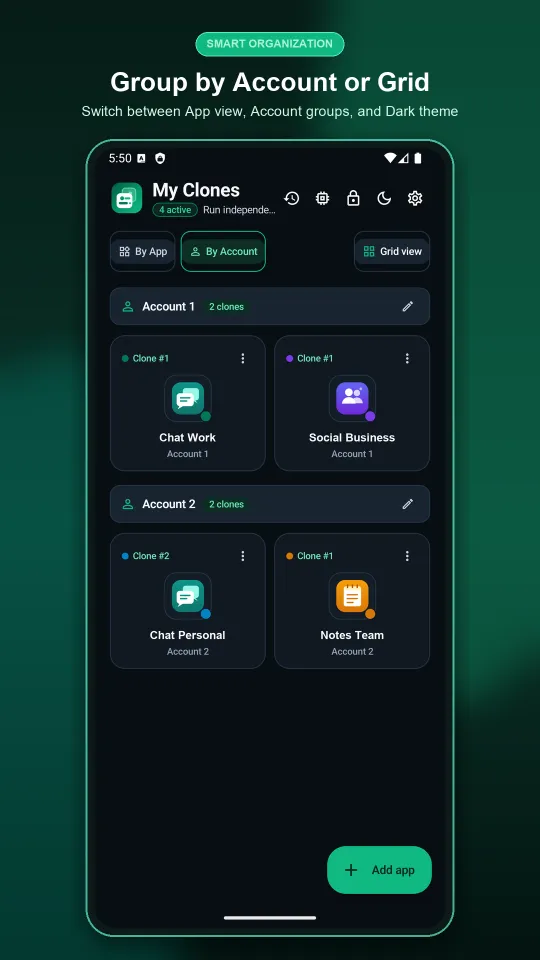
For the full walk-through of making a copy and telling copies apart, see how to run two accounts on one Android phone.
Can Duo Clone be used to read someone else’s WhatsApp?
No. Duo Clone makes a copy of an app on your own phone so you can sign in with your own account, using your own number and its verification code. It cannot read another person’s WhatsApp account or messages, it does not copy chats from someone else’s phone, and it is not a monitoring tool.
Is a WhatsApp mod the same as a clone app?
No. A WhatsApp mod is a changed version of WhatsApp built by a third party, such as GB WhatsApp, and WhatsApp says these break its rules. Its help page on unofficial apps says using them or linking your account to them violates WhatsApp’s Terms of Service, that they might carry malware, and that your account might be temporarily or permanently banned.
Duo Clone does not download or install a modified WhatsApp. It makes a copy of the official app that is already on your phone. WhatsApp’s own announcement tells people to use only the official app and to avoid imitations as a way of getting more accounts. WhatsApp’s pages do not describe cloner apps, so Duo Clone cannot promise how WhatsApp treats an account used inside a copy. Read WhatsApp’s terms yourself, and if the number matters a lot to you, such as a business line, use the official feature instead.
What will a copy not do?
A copy will not give you a second number, move one number onto two accounts, or hide anything from WhatsApp.
- One number, one account. WhatsApp’s help says an account can only be verified with one phone number, and there is no way to give one account two numbers.
- The usual limits of a copy. No device-ID or GPS change, and no security sandbox (the risks of cloning an app).
- Linked devices are different. To use the same WhatsApp account on a second phone or on a computer, use WhatsApp’s linked devices feature, not a copy.
Which option should you pick?
Pick WhatsApp’s own second account when you have two numbers and no special needs. The other cases:
- Two numbers, personal and work, nothing special: WhatsApp’s built-in second account.
- One regular, one business number: the WhatsApp Business app next to WhatsApp.
- Two Business accounts, more than two accounts, or a locked, colour-coded copy: a Duo Clone copy, with the terms caveat above.
- A mod or “WhatsApp Plus” download: avoid it.
For the wider picture on keeping several logins apart, see work and personal accounts on one phone.
Duo Clone is an independent app and is not affiliated with WhatsApp LLC or Meta. Sources checked on 18 November 2026: WhatsApp Help Center, How to switch accounts; About using multiple phone numbers or accounts; About unofficial WhatsApp apps; WhatsApp blog, Multiple Accounts Coming to WhatsApp.
How we checked: the Duo Clone add-copy steps and the setup sheet were compared with the app on 18 November 2026, on an Android 16 emulator with generic sample apps. Separately, in Duo Clone’s tests on 20 October 2026, WhatsApp opened in a copy and kept running for 20 seconds without crashing on Android 9, 12, 14 and 16 emulators and on a Samsung SM-N970U (Galaxy Note10) running a custom Android 16 build. Everything said about WhatsApp’s own features comes from the WhatsApp pages listed above, read the same day.