Samsung Galaxy phones have a built-in feature called Dual Messenger that makes a second copy of a supported app, so you can sign in to two accounts. You turn it on in Settings, under Advanced features. Dual Messenger works only with the apps Samsung supports and adds one extra copy of each, so an app cloner such as Duo Clone is for apps outside that list.

What is Dual Messenger used for, and why is it on my phone?
Dual Messenger is used to run a second account of a supported chat or social app on the same Galaxy phone. It is part of Samsung’s own software, listed under Advanced features in Settings, so it is there even if you never turned it on. Nothing is copied until you switch on an app, and a copied app is easy to spot: its icon carries the Dual Messenger symbol.
How do you turn on Dual Messenger on a Samsung phone?
Open Settings, tap Advanced features, then Dual Messenger, switch on the app you want, and tap Install. Samsung’s support page gives these steps:
- Open Settings, tap Advanced features, then tap Dual Messenger.
- Tap the switch next to the app you want to duplicate.
- Tap Install, read the notice, and tap Confirm if asked.
- Open the new copy, which carries the Dual Messenger symbol on its icon, and enter the details of your second account.
Screens and wording can differ with your carrier, software version and phone model, as Samsung itself notes. If you cannot find the menu, search for “Dual Messenger” in Settings.
Which apps and phones does it work with?
Dual Messenger works only with a short list of supported apps, and only on Samsung Galaxy phones that include the feature. Samsung’s pages name only a handful of messaging and social apps, followed by “and more”. One of them lists recent Galaxy S, Z Fold, Z Flip and some A models. Neither gives a complete list for every phone.
If the app you want is not in the list in Dual Messenger, the built-in feature cannot copy it. Some apps that already let you sign in to several accounts may not appear either. Check your own phone’s list rather than trusting a table online, including this one. For WhatsApp, how dual WhatsApp works through WhatsApp itself, Dual Messenger or a clone app compares the three routes.
How do you keep contacts and files apart?
Dual Messenger can keep a separate contacts list for the second app. Go to Settings, Advanced features, Dual Messenger, tap Use separate contacts list, switch it on, then tap Add and choose the contacts that copy may use.
Files from the second copy are stored separately too. Samsung notes that downloaded images may not appear in Gallery; look in My Files, under Internal storage (Dual Messenger). Samsung also says the second copy needs extra storage.
What happens when you remove the second copy?
Removing the copy deletes the data inside it. Turn the app’s switch off in Dual Messenger to uninstall the second copy. Samsung’s menu also has Delete all my data under More options, which removes all Dual Messenger apps and their data.
Save anything you need from that copy first. Samsung’s pages do not describe a built-in way to back up a Dual Messenger copy.
Where does Dual Messenger stop?
Dual Messenger stops at the apps Samsung supports and at one extra copy of each. It only exists on Samsung Galaxy phones, so a phone from another brand or a later switch means starting again.
That is the honest case for the built-in feature too: if your app is on the list and you only need two accounts, use it. It needs no extra app.
When does an app cloner such as Duo Clone make sense?
Duo Clone makes sense when the app you want is not on Samsung’s list, when you want more than one extra copy, or when you want to organise copies. It works on Android 6 through 16 on any brand, and you pick the app from the apps already on your phone.
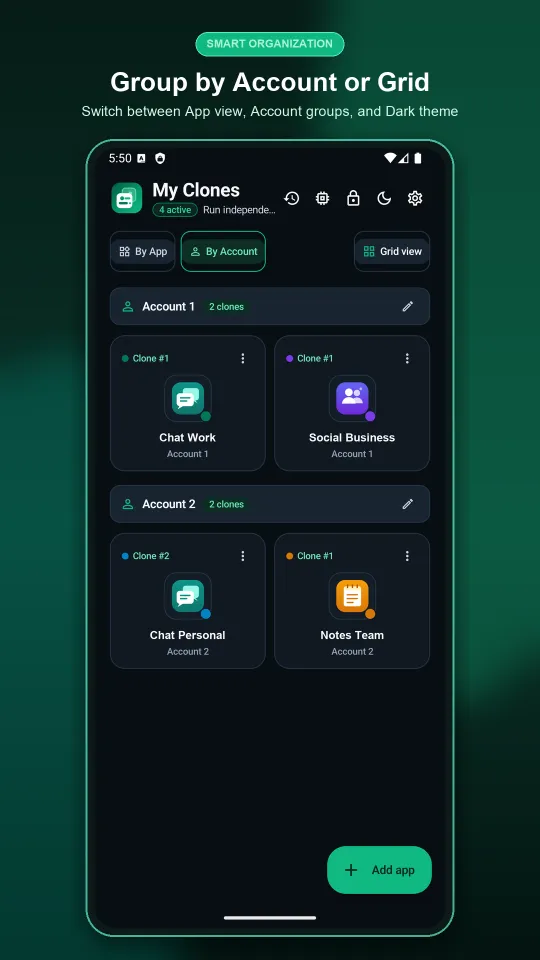
What Duo Clone adds over the built-in feature: up to five copies of the same app made in one go, a name, icon and colour badge for each copy, account spaces (Account 1, Account 2), encrypted backup to a password-locked file, a memory manager with real RAM and storage per copy, and quick switch from a bubble or notification.
Duo Clone has limits of its own. Banking and wallet apps that ask Android for a secure environment will not run in a copy (see apps that cannot be cloned), and copies share your phone’s Android user, which keeps accounts apart without locking one copy away from another. Duo Clone is an independent app and is not affiliated with Samsung.
Other brands have their own versions; see built-in dual apps by Android brand. Compare the options on the dual app page, or follow the step-by-step guide to two accounts on one phone. For the basics, read what an app cloner is.
Sources
- Samsung US support: Set up Dual Messenger on your Galaxy phone or tablet
- Samsung support (UAE): How to use the Dual Messenger feature on Galaxy device
How we checked: the Dual Messenger steps follow the two Samsung pages under Sources, read on 18 November 2026. The Duo Clone features named here were compared with the app the same day, on an Android 16 emulator with generic sample apps.